Add an E-Book only ISBN to the TX-MF
Adding an E-Book only ISBN to the MF
As times are changing, there are now titles that are only available as an e-book option normally referred as EISBN. These can be added to the system but there are a few items that need to be set correctly so that only the e-book will be an option.
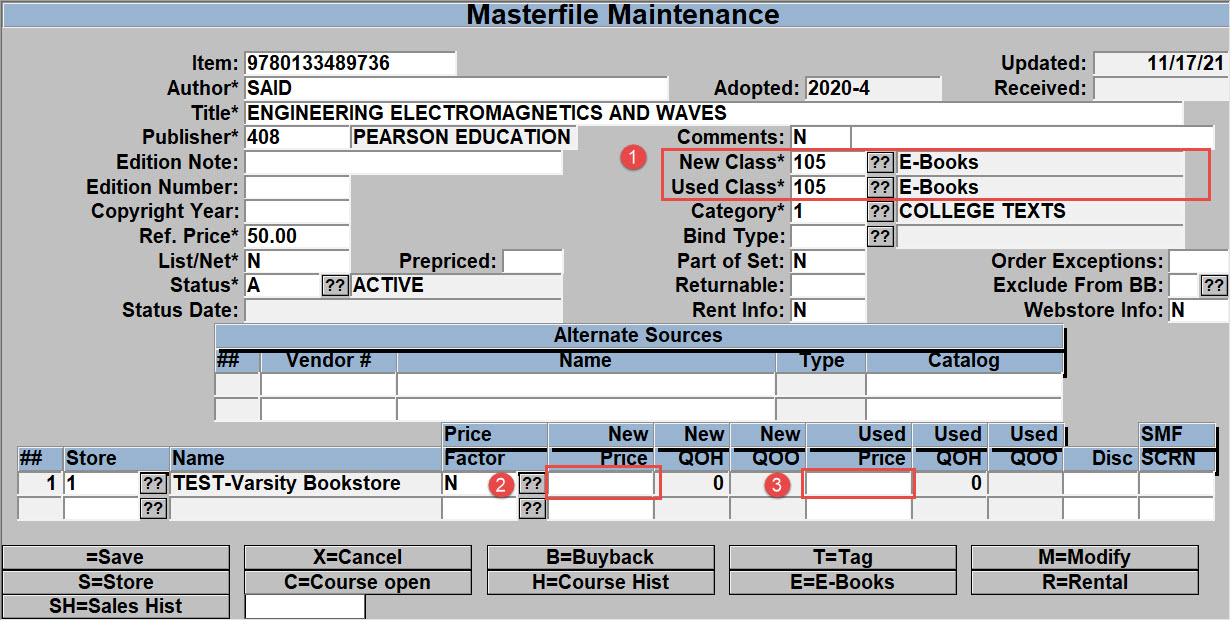
When creating the ISBN in the mf record, setting the record as below will prevent the New/Used options from displaying on the website and when selling the ISBN, only the E-Book option will be available on the register.
- in the New/Used Class you need to use the E-Book class code that you have setup.
- New Price needs to be BLANK or NULL (NOT 0.00)
- Used Price needs to be BLANK or NULL (NOT 0.00)
Once the MF record has been created then you can attach the ISBN to the courses the same as always. When adopting the title to courses/sections you will need to set the QTC to 0 to prevent the system from trying to order quantities through wantlisting or through publisher orders. (You may want to edit the ‘Order Exceptions’ and ‘Exclude from BB’ options in the MF record to make sure that the title is not added to a wantlist/PO and excluded from all BB options.)
If the title was created via some kind of course/book import then you will need to edit the MF record as directed above.
Set the E-book UPC codes up as normal. If you create the E-Book only ISBN then the next time you download your E-Book list from your vendor then the UPC/Selling periods will be created the same as they are with a standard ISBN.