REORDER SKU SEQUENCE IN WEB CATALOG
REORDER SKU SEQUENCE IN WEB CATALOG
- Bring up the catalog that you wish to change the SKU order for by going to POS.26.2 and then bring up the correct catalog.
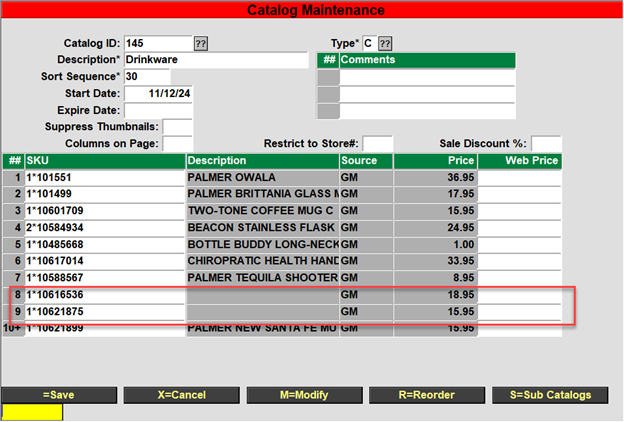
- If you see some items without a description, you should delete the SKUs for those items since they no longer exist. Place the cursor in the SKU field, hit the enter key and answer yes to the question if you wish to delete the item.
- You can follow the same sequence above to remove items from the catalog. Items with zero quantity on hand will not display on the webpage. You can run the report, POS.RP.4.5, to get a report on the catalogs with the items and the QOH to help you determine which items should be removed from a catalog because the item will no longer be stocked.
- Next, select the R=Reorder from the bottom prompt.
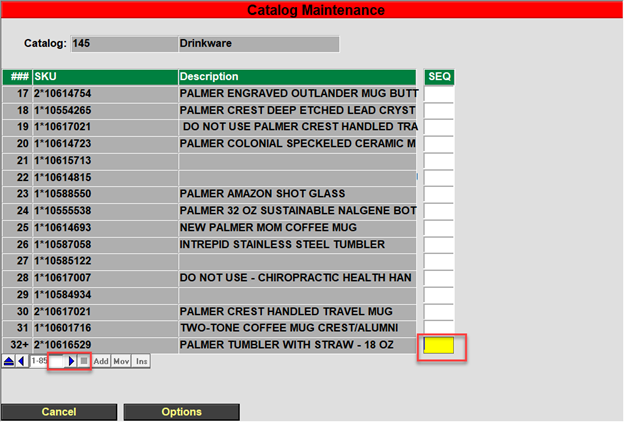
- Click in the bottom ‘SEQ’ field and then select the > to advance to the next page, or you can just keep hitting the enter key to keep advancing 1 line at a time.
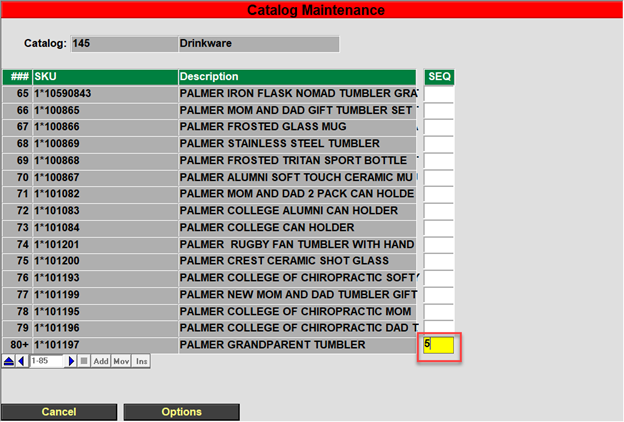
- When you get to a line that you wish to move, in the ‘SEQ’ field, enter the line number that you would like to move the line to and then hit the enter key.
- When done, select the save option from the bottom line.